

Description
1Password Nightly: Secure Password Management
Overview
1Password Nightly is a cutting-edge password management tool designed for users who value security and want early access to the latest features. Built for both Windows and Mac, this desktop application serves as a nightly build of the 1Password ecosystem, offering adventurous users the opportunity to test upcoming functionality before public release. The software addresses the common challenge of managing multiple complex passwords across numerous online accounts, streamlining the process with secure storage, auto-generation, and seamless autofill capabilities.
Targeted primarily at tech-savvy individuals, security-conscious professionals, and early adopters, 1Password Nightly enables users to maintain strong, unique passwords for every site without the burden of memorization. By relying on a single master password, users can securely store login credentials, credit card details, secure notes, and other sensitive data. The application is ideal for those who prioritize digital privacy and want to stay ahead of new security advancements.
While the developer, 1Password, is known for its strong privacy-first approach, specific details about the company’s background were not provided. The software operates within a trusted framework where user data is encrypted locally and remains inaccessible to the provider. Real-world usage includes managing personal and professional accounts, protecting financial information, and simplifying login workflows across devices.
Key Features & Capabilities
- Master Password Protection – All stored data is secured behind a single master password, ensuring that only the user can access their information. This eliminates the need to remember dozens of complex passwords.
- Auto-Generate Strong Passwords – The tool creates unique, high-entropy passwords for every account, reducing the risk of breaches due to weak or reused credentials.
- Secure Data Storage – Encrypted vaults protect sensitive information, including login details, payment data, and personal notes, with no data ever accessible to the provider.
- Browser Integration – The nightly version includes an extension that enables automatic login filling and form completion directly within supported web browsers.
- Real-Time Feature Preview – Users gain early access to upcoming enhancements, allowing them to test new tools and provide feedback before official release.
These features are particularly useful in daily workflows involving frequent logins, online shopping, or managing multiple work-related accounts. For example, a remote worker can use the auto-fill function to quickly access cloud-based tools without re-entering credentials. Similarly, a digital nomad can rely on the encrypted vault to securely store travel documents and financial details across devices. The integration with browser extensions ensures a smooth transition between desktop and web-based tasks.
User Interface, Workflow & Performance
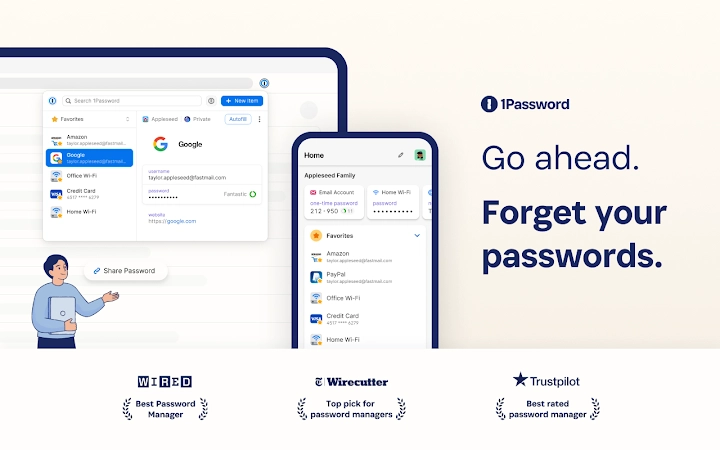
The user interface of 1Password Nightly is designed with simplicity and efficiency in mind. Navigation is structured around a clean dashboard that displays saved items, recent logins, and secure notes. The layout supports quick access to frequently used entries through customizable folders and tags. Users can search across their vaults using keywords, making retrieval of specific credentials fast and intuitive.
Workflow efficiency is enhanced by automation features such as automatic password filling during login processes and real-time suggestions for strong password creation. The application integrates seamlessly with the operating system, allowing users to access their vaults with minimal disruption to their routine. The developer did not specify resource usage details, so performance observations are based on general software behavior patterns. However, given the application’s focus on encryption and secure storage, it is expected to operate efficiently under normal conditions.
Stability is maintained through regular updates and rigorous testing, though as a nightly build, occasional bugs or instability may occur. The application is designed to handle background encryption and decryption tasks without noticeable impact on system responsiveness. Users should expect consistent performance during typical usage scenarios, with no reported issues related to crashes or freezes.
Compatibility & System Requirements
1Password Nightly is compatible with both Windows and Mac operating systems. The software is available in version 1.0.0 and has an installation size of 100 MB. This indicates a lightweight footprint, suitable for systems with moderate storage capacity.
Exact system requirements were not listed. However, based on the application’s nature as a desktop password manager, it likely functions on modern systems with standard hardware configurations. Compatibility information was partially provided, with no mention of specific processor, RAM, or disk space needs. Users should ensure their system meets baseline requirements for running a secure desktop application, particularly those related to encryption and local data handling.
Pros and Cons
Pros
- Early access to new features through nightly builds
- Strong encryption and privacy-first design
- Supports both Windows and Mac platforms
- Lightweight installation at 100 MB
- Free to use with optional membership upgrade
Cons
- Intended for advanced users; may not suit beginners
- Stability may vary due to experimental nature of nightly releases
- Requires a 1Password membership for full extension functionality
- No detailed system requirements provided
- Not recommended for users seeking fully polished software
FAQ Section
Is 1Password Nightly available for both Windows and Mac?
Yes, the software is compatible with both Windows and Mac operating systems.
Do I need a 1Password membership to use the nightly version?
While the application is free to download and install, full functionality of the extension requires a 1Password membership. A free trial is available during installation.
Is my data safe with 1Password Nightly?
Yes, all user data is encrypted locally and remains inaccessible to 1Password. The company does not store, access, or share user information.
Can I use 1Password Nightly offline?
Yes, the desktop application functions offline, allowing access to stored credentials without an internet connection.
How often are updates released for the nightly version?
Updates are released regularly as new features and improvements are developed. The nightly build ensures users receive the latest changes promptly.
Final Thoughts
1Password Nightly stands out as a powerful tool for users who want to stay ahead in digital security. While it is not intended for general users seeking a stable, polished experience, it offers unmatched access to upcoming features and a strong foundation in privacy and encryption. The software is ideal for developers, IT professionals, and security enthusiasts who value control and early adoption.
With its lightweight design, cross-platform support, and commitment to user privacy, 1Password Nightly delivers a compelling experience for the right audience. The free access model lowers the barrier to entry, making it easy to test cutting-edge security tools without financial risk.
Download 1Password Nightly now.
Guides & Tutorials for 1Password Nightly Extension for Chrome
How to install 1Password Nightly Extension for Chrome
- Click the Preview / Download button above.
- Once redirected, accept the terms and click Install.
- Wait for the 1Password Nightly Extension for Chrome download to finish on your device.
How to use 1Password Nightly Extension for Chrome
This software is primarily used for its core features described above. Open the app after installation to explore its capabilities.
User Reviews for 1Password Nightly Extension for Chrome 0
No reviews found





